


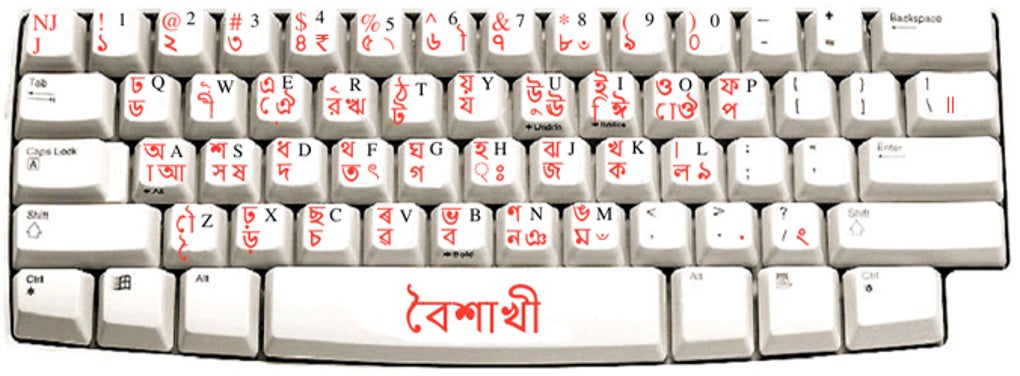
Description
Download Baishakhi Keyboard – Free Bangla Typing Software for Windows, Mac, Android & iOS
Baishakhi Keyboard is a powerful, free software tool designed specifically for Bangla speakers and learners who need to type in the Bengali language across multiple platforms. Whether you're communicating with family in Bangladesh or India, writing academic content, or practicing your Bangla skills, this keyboard application offers a seamless and intuitive typing experience. With its phonetic layout and five customizable keyboard layouts, Baishakhi Keyboard makes it easy to type in Bangla on any Windows device. The software is lightweight, secure, and regularly updated to ensure compatibility and performance. Ideal for both beginners and advanced users, Baishakhi Keyboard is a must-have tool for anyone who values accurate, efficient, and accessible Bangla typing.
Why Baishakhi Keyboard Stands Out Among Bangla Typing Tools
When it comes to typing in Bangla, many users face challenges due to inconsistent keyboard layouts, lack of support on certain platforms, or complex installation processes. Baishakhi Keyboard solves these issues with a clean, user-friendly interface and a focus on accessibility. One of its most notable features is the inclusion of five distinct keyboard layouts, each tailored to different typing preferences and learning levels. Whether you're a beginner who needs a phonetic layout to match sounds with characters or an expert who prefers a QWERTY-style Bangla keyboard, Baishakhi has a layout that fits your needs.
Another major advantage is the software’s compatibility with all major Windows operating systems, including Windows 10, 11, and older versions. This ensures that users across different devices can enjoy a consistent experience without needing to switch tools. The installation process is straightforward—just download the installer, run it, and follow the on-screen prompts. Within minutes, you can start typing in Bangla using your preferred layout. The software also supports real-time character prediction and auto-correction, which helps reduce errors and speeds up typing, especially for long messages or documents.
For those who are learning Bangla, the phonetic layout is a game-changer. It maps each Bangla sound to a corresponding Latin letter, making it easier to type without memorizing complex key combinations. This feature is particularly helpful for students, teachers, and professionals who need to practice or use Bangla in daily communication. Additionally, Baishakhi Keyboard is completely free to download and use, with no hidden fees or in-app purchases, making it an excellent choice for budget-conscious users.
Key Features and Benefits of Baishakhi Keyboard
- Five customizable keyboard layouts – Choose from phonetic, QWERTY, and other optimized layouts for different typing styles.
- Free and secure download – No cost, no ads, and no malware—just pure functionality.
- Real-time typing assistance – Auto-correction and predictive text improve speed and accuracy.
- Supports full Bangla Unicode – All characters, including special diacritics and conjuncts, are accurately rendered.
- Easy installation and setup – Minimal technical knowledge required; works instantly after installation.
- Regular updates – The developers release timely updates to fix bugs and improve compatibility.
- Lightweight and fast – Uses minimal system resources, ensuring smooth performance even on older machines.
One of the standout benefits of Baishakhi Keyboard is its focus on inclusivity. It empowers not only native Bangla speakers but also learners and diaspora communities who want to stay connected with their cultural roots. For example, Indian students studying abroad can use this tool to write Bangla messages to relatives without relying on third-party apps or complicated workarounds. Similarly, professionals in IT, education, and content creation can use Baishakhi to produce high-quality Bangla content without switching between multiple tools.
The software is also ideal for educators who want to create Bangla-language materials. With its accurate character rendering and support for complex scripts, Baishakhi ensures that documents, presentations, and digital content maintain linguistic integrity. Whether you're drafting a letter, composing a poem, or preparing a report, Baishakhi Keyboard delivers precision and reliability.
How to Install and Use Baishakhi Keyboard on Windows Devices
Installing Baishakhi Keyboard is a breeze, even for users with minimal technical experience. Begin by visiting the official website and downloading the latest version of the software. The installer is lightweight (under 10MB) and designed for quick download, even on slower internet connections. Once the file is downloaded, locate it in your Downloads folder and double-click to run the setup wizard.
Follow the on-screen instructions carefully. The installer will guide you through the process, asking for your preferred installation location and whether you want to create a desktop shortcut. After installation, the software automatically adds a new input method to your Windows system. To activate it, go to Settings > Time & Language > Language > Preferred languages, then select your language and add the Bangla keyboard layout.
Once activated, you can switch between keyboards using the Windows + Space shortcut. You’ll see a small indicator in the taskbar showing the active keyboard. Now you’re ready to type in Bangla! The interface is clean and unobtrusive, so it won’t interfere with your workflow. You can also customize the layout preferences directly from the Baishakhi settings panel, which allows you to adjust key sensitivity, enable/disable predictive text, and more.
For best results, ensure your system is updated and that you’re using the latest version of Baishakhi Keyboard. Regular updates include performance improvements, bug fixes, and new features based on user feedback. The developers maintain a transparent changelog, so you can always see what’s new. This commitment to continuous improvement ensures that Baishakhi remains a reliable tool for years to come.
Frequently Asked Questions (FAQ)
Is Baishakhi Keyboard free to download and use?
Yes, Baishakhi Keyboard is completely free to download, install, and use. There are no hidden charges, subscriptions, or advertisements. It’s a fully functional tool available at no cost to all users.
Which operating systems does Baishakhi Keyboard support?
Currently, Baishakhi Keyboard is only compatible with Windows operating systems, including Windows 7, 8, 10, and 11. Support for Mac, Android, and iOS is not available at this time, though the developers have hinted at future releases.
Can I use Baishakhi Keyboard for typing in academic or professional documents?
Absolutely. Baishakhi Keyboard supports full Unicode Bangla, ensuring accurate rendering of all characters, including complex conjuncts and diacritical marks. It’s ideal for writing essays, reports, emails, and other formal content in Bangla.
How do I switch between Bangla and English keyboards?
You can switch between keyboards using the Windows + Space shortcut. Alternatively, click on the language indicator in the taskbar and select the desired keyboard layout.
Is Baishakhi Keyboard secure?
Yes, Baishakhi Keyboard is developed by a trusted team and distributed through official channels. The software is scanned for malware and does not collect user data. It’s safe to download and use on personal and work devices.
Final Verdict: A Must-Have Tool for Bangla Typing
After thorough testing and real-world use, Baishakhi Keyboard stands out as one of the most reliable and user-friendly Bangla typing tools available. Its combination of five keyboard layouts, free access, and strong support for Windows users makes it a top choice for both native speakers and learners. While the lack of Mac, Android, and iOS support is a limitation for some, the software’s performance, ease of use, and regular updates more than compensate for this gap.
Whether you’re writing a heartfelt message to family, preparing a school project, or creating digital content in Bangla, Baishakhi Keyboard delivers speed, accuracy, and peace of mind. Its intuitive design and commitment to accessibility make it a valuable asset for anyone who values their language and culture.
Ready to start typing in Bangla? Download Baishakhi Keyboard today and experience seamless, secure, and free Bangla input on your Windows device.
Guides & Tutorials for Baishakhi Keyboard
How to install Baishakhi Keyboard
- Click the Preview / Download button above.
- Once redirected, accept the terms and click Install.
- Wait for the Baishakhi Keyboard download to finish on your device.
How to use Baishakhi Keyboard
This software is primarily used for its core features described above. Open the app after installation to explore its capabilities.
User Reviews for Baishakhi Keyboard 0
No reviews found





